
Dictionaries
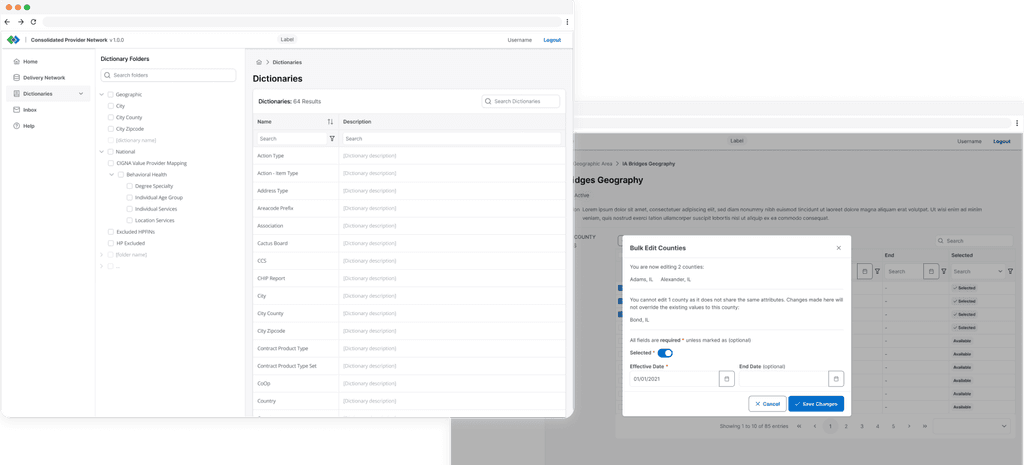
Unifying a core internal tool across multiple products for increased usability and faster searching and updating.
HealthPartners
Web Only
Timeframe
August - October 2024 (3 mo)
Team
1 designer (me), 1 product manager, 2 full-stack developers
Deliverables
Figma pattern, documentation
Timeframe
August - October 2024 (3 mo)
Team
1 designer (me), 1 product manager, 2 full-stack developers
Deliverables
Figma pattern, documentation
Background
Overview
Overview
Insurance processors depend on accurate reference data to complete forms quickly. HealthPartners had multiple versions of dictionaries that matched fields like states, counties, and specialties to insurance information like customer eligibility, renewal periods, and network providers. This allowed our internal users to easily select various fields to pre-populate policy information when setting up a new entity in our system. Over time, dictionaries were individually recreated across multiple products, each with its own layout and naming. The inconsistencies slowed down workflows and made training harder.
What we did
Problems to solve
Problems to solve
1
Different versions in every product
Different versions in every product
Each tool had its own version of dictionaries with differing layouts and labels. Employees had to relearn how to perform the same task depending on which tool they were working with.
Each tool had its own version of dictionaries with differing layouts and labels. Employees had to relearn how to perform the same task depending on which tool they were working with.
2
Slow and unintuitive search with deep hierarchies
Slow and unintuitive search with deep hierarchies
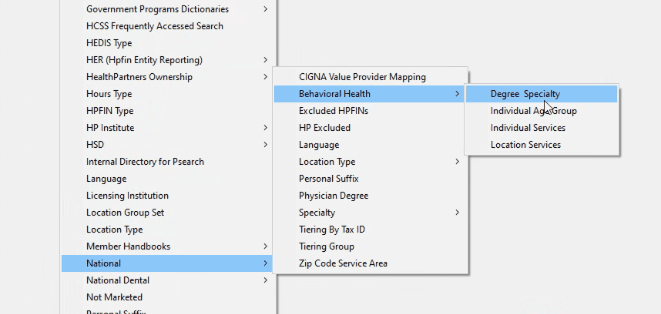
It often took multiple clicks to drill down to the right dictionary item. Many items were hidden three or more levels down, which made it especially hard for new hires to locate what they needed without memorizing steps.
It often took multiple clicks to drill down to the right dictionary item. Many items were hidden three or more levels down, which made it especially hard for new hires to locate what they needed without memorizing steps.
3
Difficult to update
Difficult to update
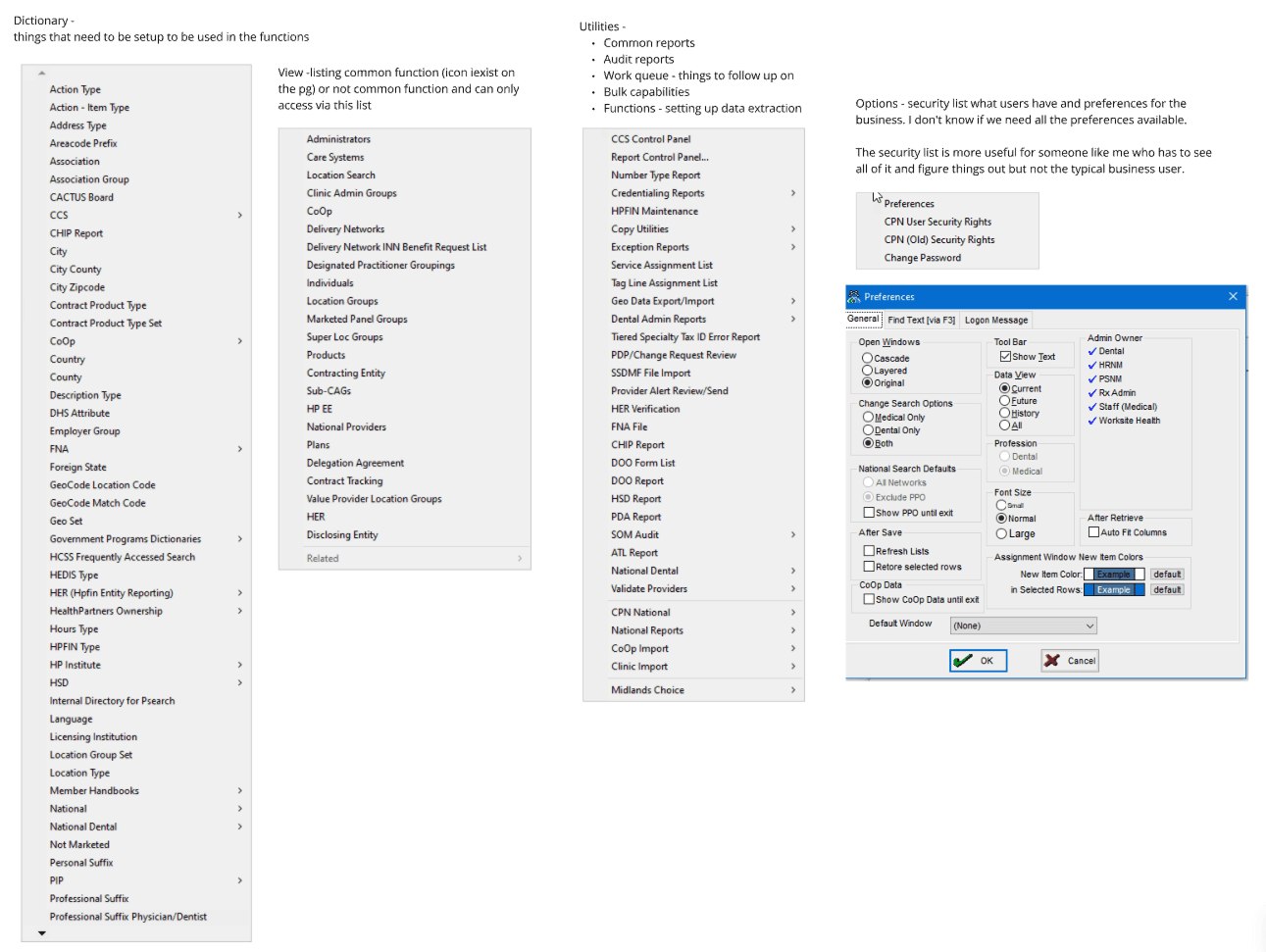
Sometimes there was a need to updating entries. This process was also clunky and time-consuming, especially when employees needed to edit more than one item at a time.
Sometimes there was a need to updating entries. This process was also clunky and time-consuming, especially when employees needed to edit more than one item at a time.
4
Outdated software
Outdated software
All of the products still lived in several legacy desktop applications built over a decade prior. As the organization moved to web apps, Dictionaries needed to be modernized and made consistent across systems.
All of the products still lived in several legacy desktop applications built over a decade prior. As the organization moved to web apps, Dictionaries needed to be modernized and made consistent across systems.
My role
My role
I conducted an audit of existing patterns and created a unified version by:
I conducted an audit of existing patterns and created a unified version by:
Standardizing search and filter placement across all products.
Standardizing search and filter placement across all products.
Adding breadcrumb navigation for deep hierarchies.
Adding breadcrumb navigation for deep hierarchies.
Aligning terminology and layouts for predictable interactions.
Aligning terminology and layouts for predictable interactions.
Revamping the CRUD operations for dictionary items.
Revamping the CRUD operations for dictionary items.
Implementation
Old implementation
Old implementation
1
Deep layers of navigation
Deep layers of navigation
2
Outdated CRUD operations
Outdated CRUD operations
New implementation
New implementation
1
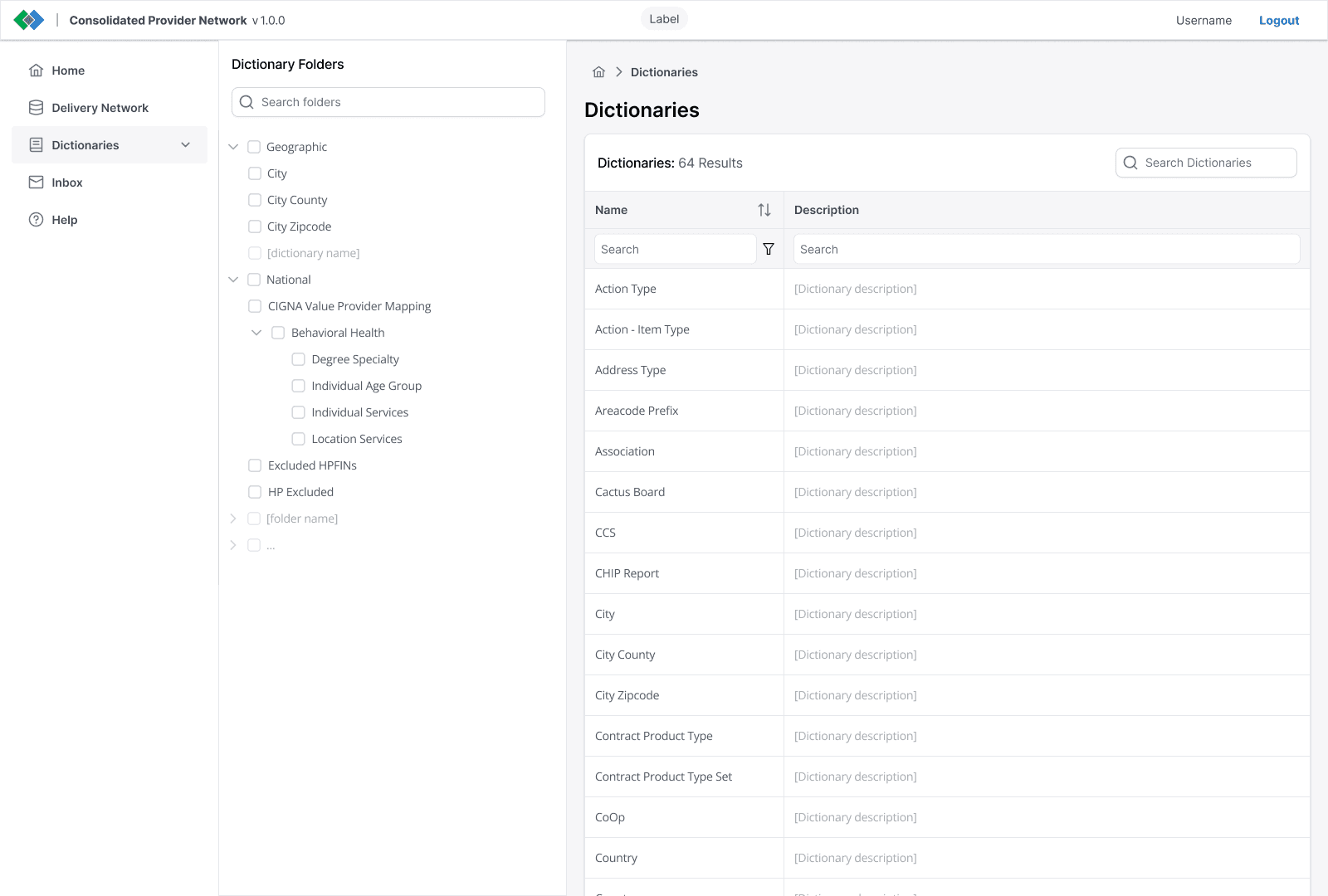
Dictionary search screen
Dictionary search screen
The dictionary search screen could search through multiple layers of hierarchy and also surfaced the menu items in a more straightforward "folder" approach that was familiar to our users from other digital products they used.
The dictionary search screen could search through multiple layers of hierarchy and also surfaced the menu items in a more straightforward "folder" approach that was familiar to our users from other digital products they used.
2
Treatment for further sublevels of dictionary
Treatment for further sublevels of dictionary
Although simplifying down the hierarchies was a big push, some dictionaries still had a high level of specifity that warranted multiple levels of organization. Our goal was to make it easier for someone new to the technology to onboard but not take away the flows that existing internal users had formed habits around. This meant creating consistent landing pages where these deeper levels were necessary.
Although simplifying down the hierarchies was a big push, some dictionaries still had a high level of specifity that warranted multiple levels of organization. Our goal was to make it easier for someone new to the technology to onboard but not take away the flows that existing internal users had formed habits around. This meant creating consistent landing pages where these deeper levels were necessary.
3
Add new dictionary entry
Add new dictionary entry
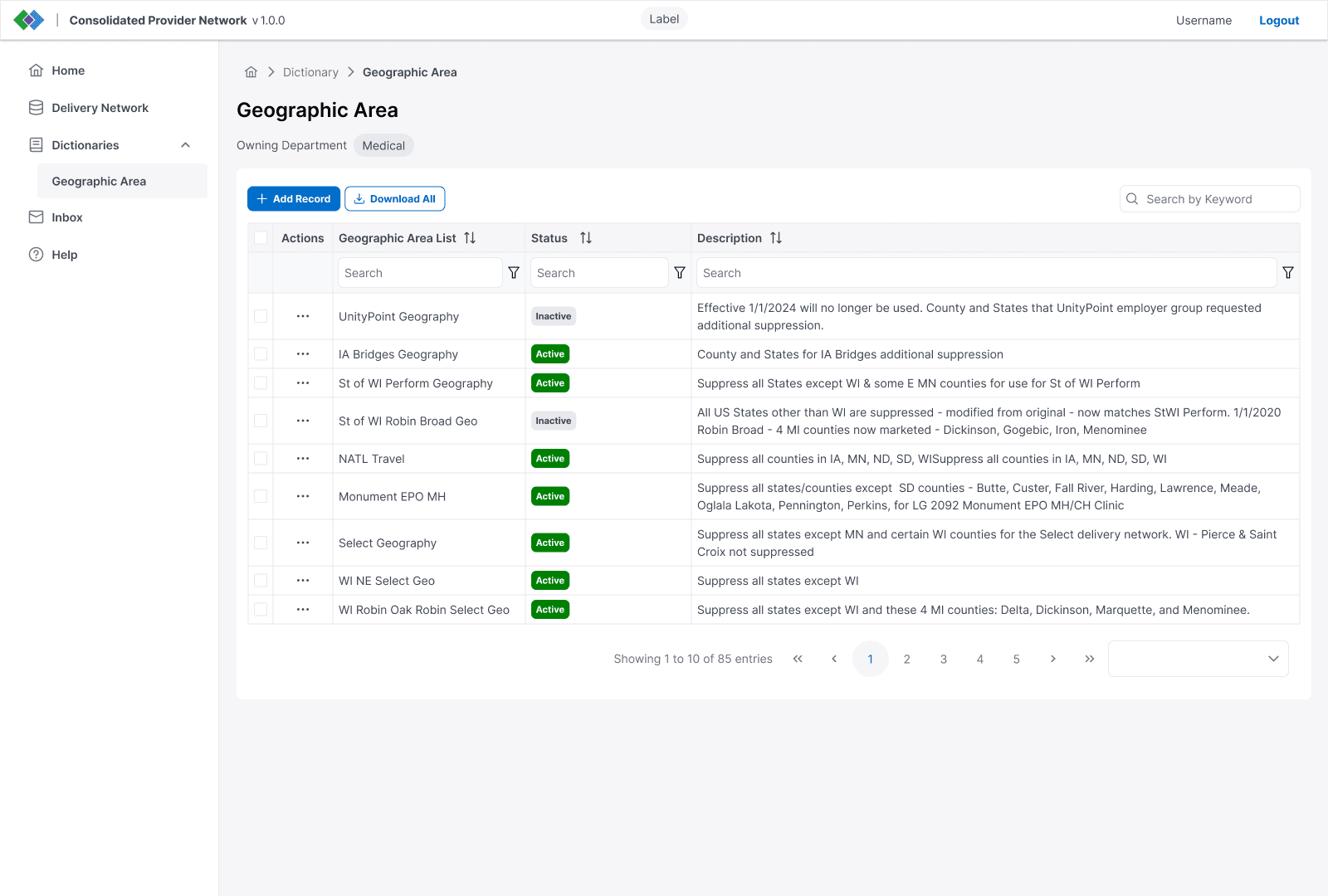
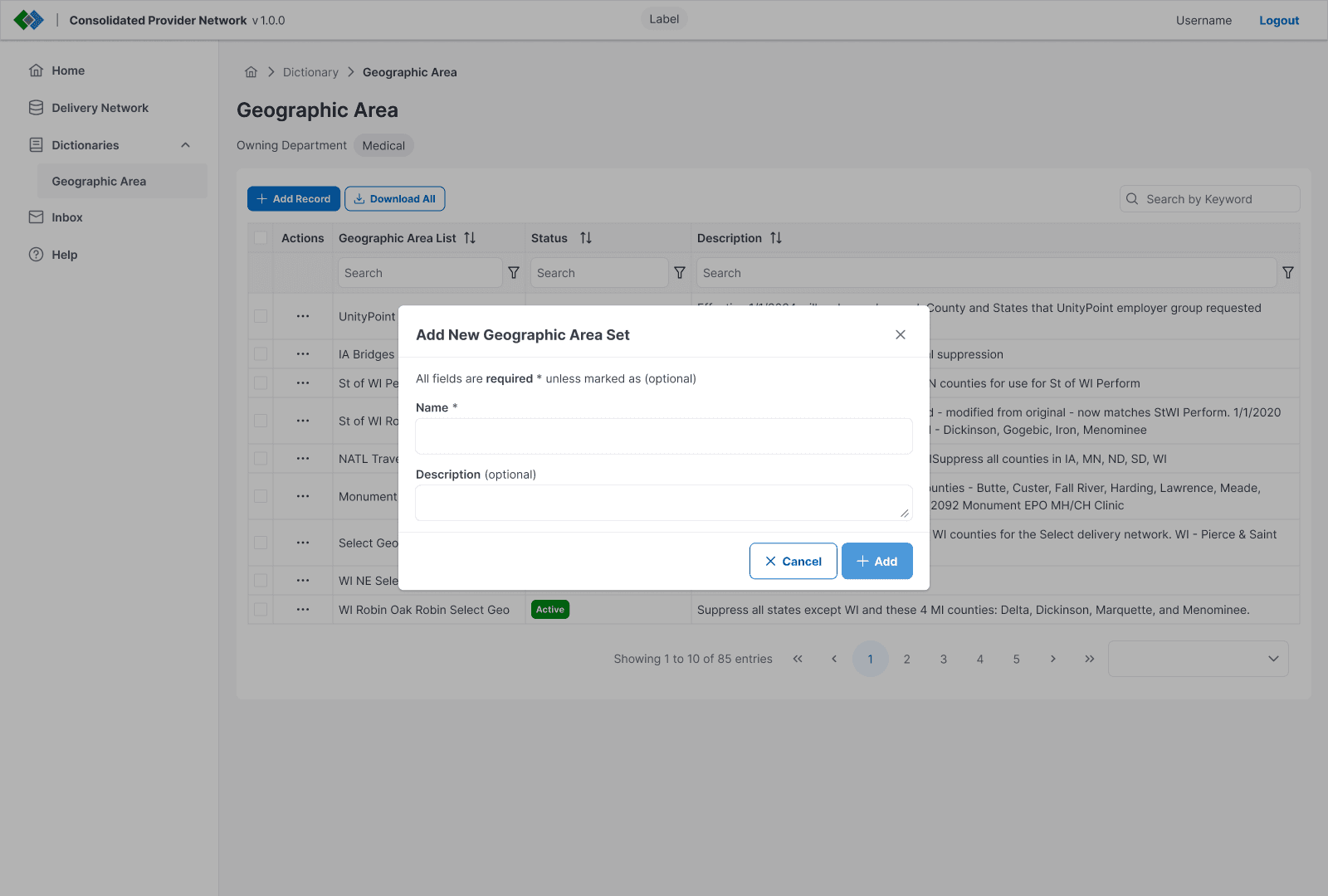
In an effort to simplify the CRUD (create, read, update, delete) operations across multiple products, I conducted an audit of the various implementations and developed a updated but familiar approach to shape how users could expect to view and add/edit the dictionary entries in the future.
In an effort to simplify the CRUD (create, read, update, delete) operations across multiple products, I conducted an audit of the various implementations and developed a updated but familiar approach to shape how users could expect to view and add/edit the dictionary entries in the future.
4
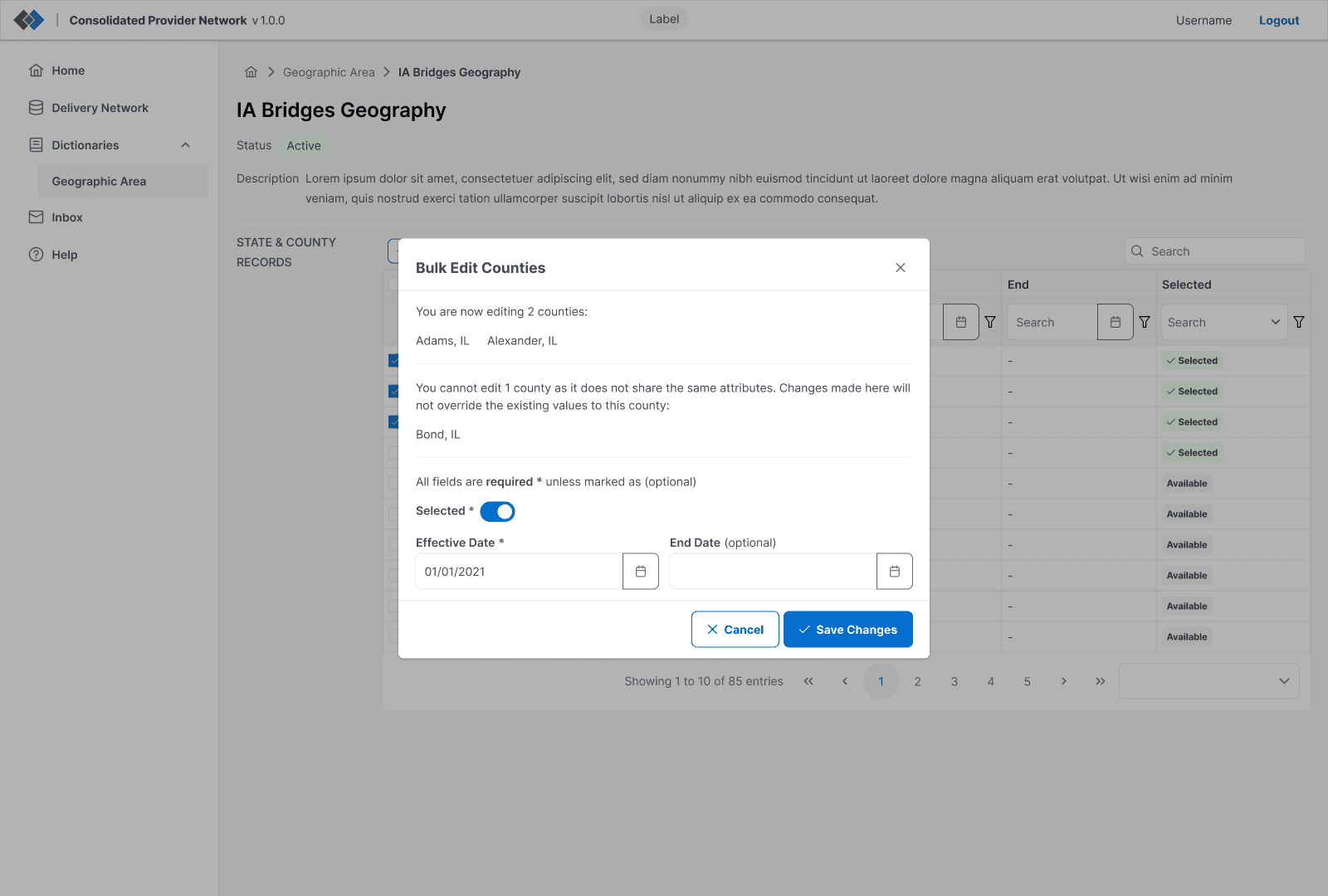
Bulk edit entries
Bulk edit entries
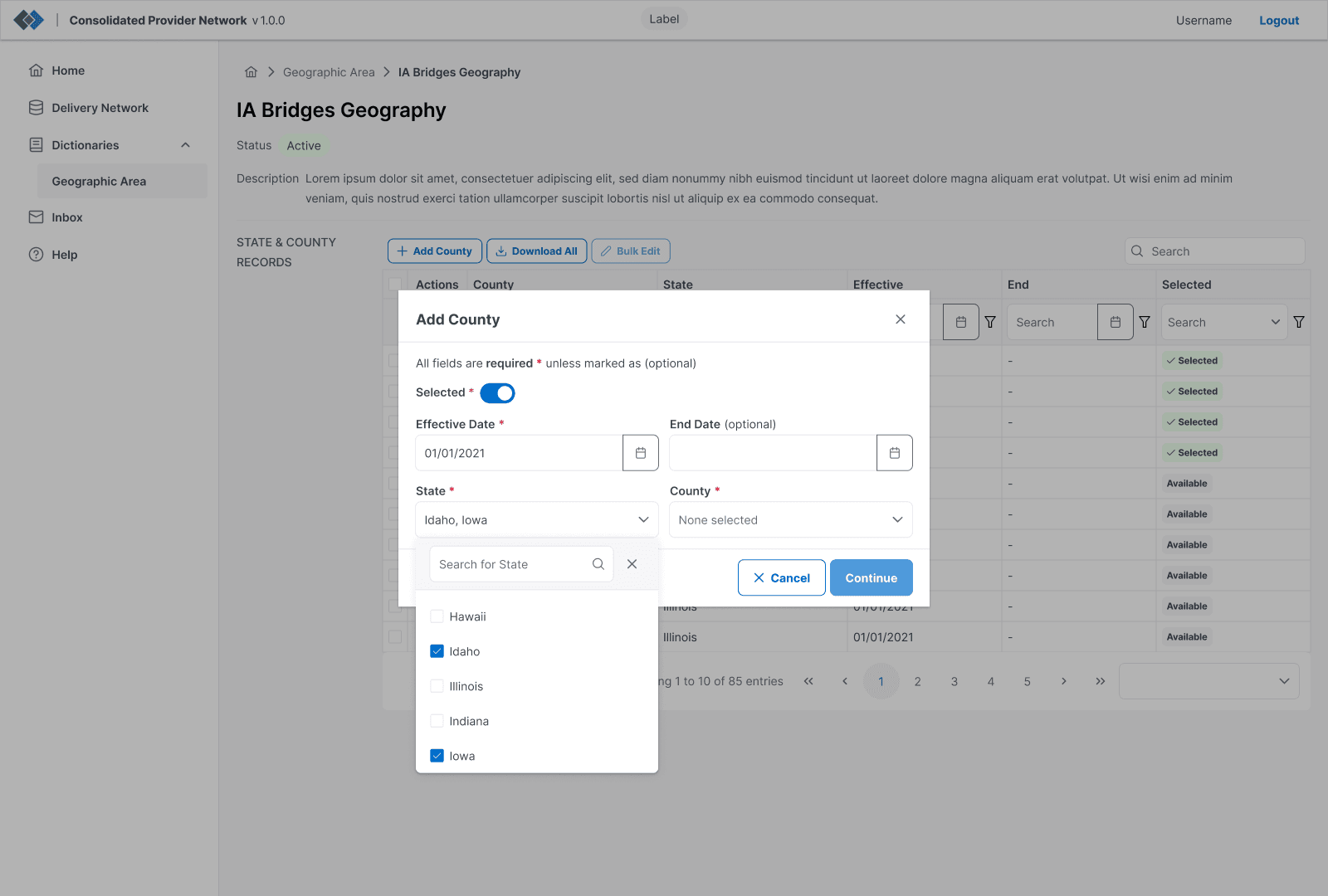
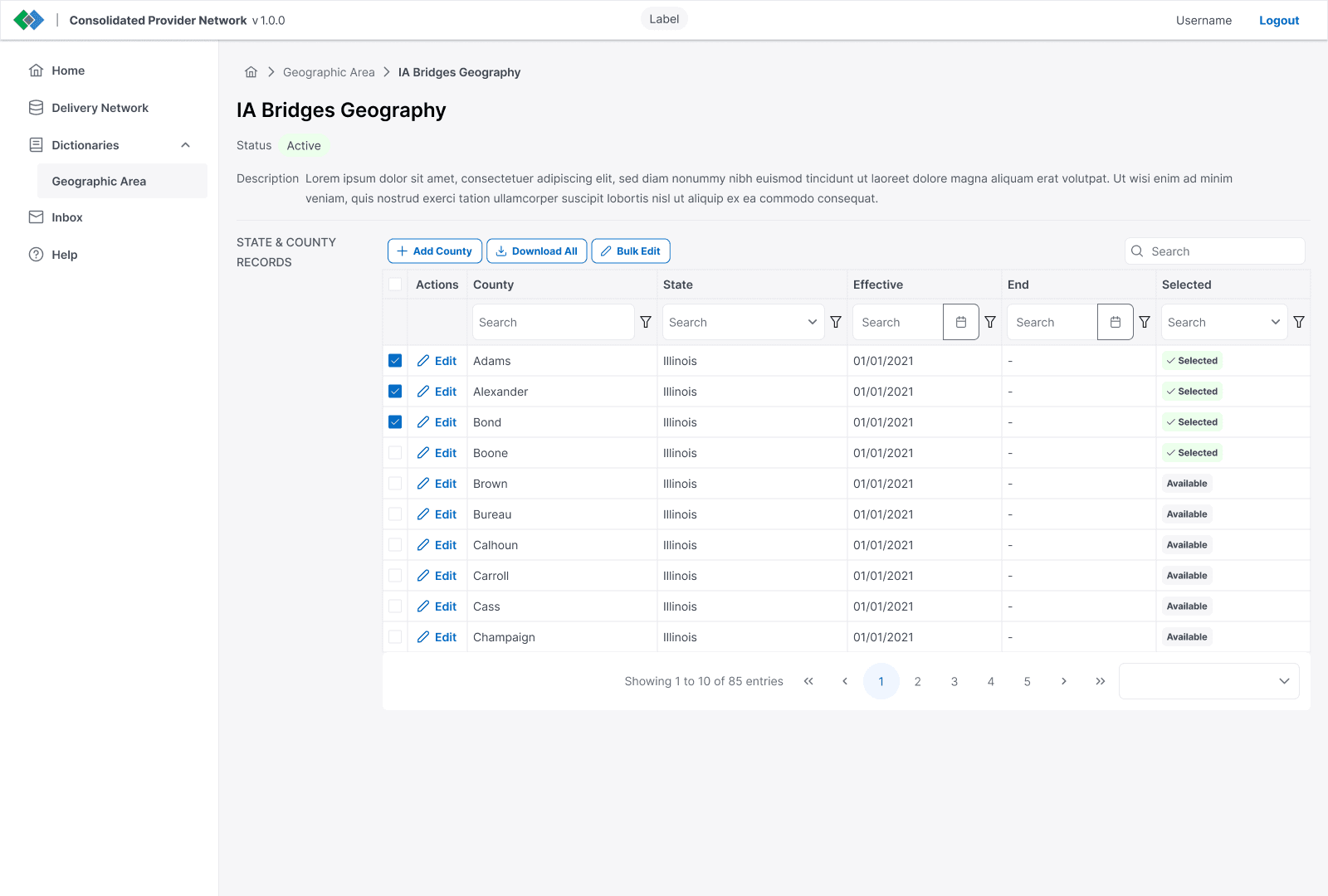
Another feature that users had wanted was the ability to quickly conduct multiple edits across the dictionaries of their apps. After examining how such patterns were handled across our suite of internal products, bulk edit was introduced as a pattern.
Another feature that users had wanted was the ability to quickly conduct multiple edits across the dictionaries of their apps. After examining how such patterns were handled across our suite of internal products, bulk edit was introduced as a pattern.
Results
Outcomes
Outcomes
Consistency across tools
Consistency across tools
With the unified pattern, employees no longer had to switch mental gears between products. Everything followed the same structure, which cut down on confusion.
With the unified pattern, employees no longer had to switch mental gears between products. Everything followed the same structure, which cut down on confusion.
Faster processing
Faster processing
By reducing search times and allowing bulk edits, we cut down the average time spent on dictionary tasks. The first round of usability testing across our sample users indicated this as an improvement of 40% less time spent. That gave employees more time for complex work.
By reducing search times and allowing bulk edits, we cut down the average time spent on dictionary tasks. The first round of usability testing across our sample users indicated this as an improvement of 40% less time spent. That gave employees more time for complex work.
More projects




Made with care and lo-fi animal crossing playlists 🍵
•
Tina Wang © 2026
Made with care and lo-fi animal crossing playlists 🍵
Tina Wang © 2026